Private daily journal app for a better day
Three pages a day.
Write through your thoughts.
3 Pages Daily helps you remember the past, make sense of the present, and shape what comes next, three pages at a time.
Today's to-do list
Woke up earlier than usual 😝. Park day energy. Grabbed coffee on the way and somehow still made rope drop. The castle looked unreal in the morning light; I keep catching myself grinning for no reason.
Riding everything we can before the crowds peak. Might loop back for Elsa's show later. Already deciding this is going in the scrapbook forever...

"Okay I'm standing right in front of the castle and I genuinely cannot stop smiling! Elsa's show was unreal, the music, the lights, everything. I keep thinking I'm going to wake up. Best day in so long…"
Today, in three pages
Just today's pages, ready to fill however you need.
Plan & Focus
Start with today's to-do list. A clear list makes the day feel manageable.
Capture & Create
Open space for whatever shows up. Write, sketch, drop a photo, or paste a link.
Reflect & Record
Close the day with a few lines, a voice note, or a memory you want to keep.
Morning pages
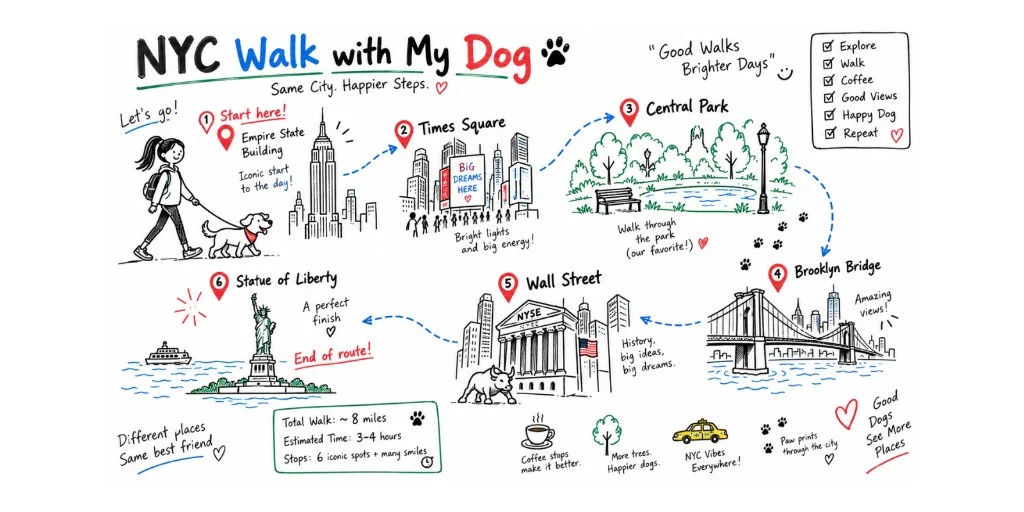
Sketching our NYC dog-walk route so I don't overthink it once we're outside.
Clear your mind,
plan your day
Inspired by Bullet Journal's rhythm of capture, focus, and review — simplified to fit inside a browser. Start each day with a to-do list at the top of the page. Come back in the evening to migrate what didn't happen.
To-Do List
A checklist at the top of the page — add as few or as many as the day needs, and rename it to whatever you call it.
Quick capture
No folder, no label required. Open and type. Organize later — or don't.
Gentle migration
At day's end, unfinished tasks surface quietly. Move them forward, mark done, or leave them.
To-Do List
Quick capture
→ Pick up dry cleaning Thursday
→ Read: The Psychology of Money
→ Book dentist appt
From yesterday
2 unfinishedMove to today, mark done, or leave as-is.
Write on it like paper
The page is always ready. Type, draw, write with a stylus — it all lives on the same surface, like a real notebook.
Rich text
Headings, bold, italic, links, checklists. Type / for a quick menu.
Draw & sketch
Insert a drawing canvas anytime. Pen, highlighter, eraser, lasso. Works with Apple Pencil on iPad.
Paper styles
Plain, ruled, dotted, or grid — choose the paper that matches how you think.

Meeting-notes.pdf
PDF · 240 KB
Make the pages yours
Your journal should feel like yours — not a generic app. Add photos and voice notes, attach files you need later, and tune themes and fonts until the page feels right.
Photos & voice on the page
Insert images and voice recordings right into today’s pages — keep the moment with the words.
Themes & writing fonts
Switch Light, Paper, Dark, and more. Pick a font that matches how you like to write.
File attachments
Attach PDFs, DOCX, and other files to a page so everything related stays in one place.
Speak now, read it later
When typing feels slow, just tap the mic. Your voice note saves instantly to the page, and transcription happens in the background — searchable once it's done.
Records immediately
Audio is saved to the page the moment you start. Close the tab and it's still there.
Transcription in the background
Walk away while your voice note becomes searchable text — no waiting around.
Edit what you said
Cleaned-up transcript lives below the waveform. Copy, edit, or move it into your main text.
"The thing I keep coming back to is the idea that clarity isn't something you find — it's something you make room for. And the journal is where I make that room."
Free: 30 min/month recording, 10 min transcription · Premium: 120 min transcription
...the thing I keep coming back to is the idea that clarity isn't something you find...
Text in photo: "Clarity is not found, it is carved." — from a whiteboard
clarity-notes.pdf · Meeting notes from the quarterly review
...morning journaling gives me the clarity I need before the meetings begin...
Find it again
One search box covers everything — text you typed, words in photos, link titles, and voice transcripts. If you wrote it, said it, or saved it, you can find it.
Text & checklists
Everything you've typed is indexed instantly.
Image OCR
Words in photos and screenshots become searchable in the background.
Voice transcripts
What you said is findable — even if you recorded it months ago.
Links
Search by page title, domain, or the note you added.
Attachments
Find the PDF or file you uploaded, by name or the note around it.
Built for brains that don't like friction
The point isn't more features. It's helping you put attention on what actually matters today: a to-do list, a journal entry, a quick summary, or a quiet reflection.
Open the app and you're already on today's page. Fewer decisions up front, so it's easier to start and stay with the thing in front of you.
Today opens first
No folder to pick, no blank dashboard. Login and the page is ready.
One place for the important stuff
Tasks, notes, and reflections live on the same daily pages, so you don't jump between tools.
Write without sorting first
Capture the thought now. Organize later only if you need to.
From yesterday — 1 item
Reply to Maya's email
Your sanctuary stays strictly private
A daily journal is one of the most personal things you can keep. We built Three Pages Daily around the assumption that you should never have to wonder who can read it.
Private by default
Your journal is yours alone. No public sharing, no social feeds.
No advertising
We don't show ads. We don't sell or share your writing or OCR results.
Encrypted in transit and at rest
Your data is encrypted between your device and our servers, and while stored.
Open export
Download all your data as Markdown or PDF at any time, for free.
Write on whatever you already use
The same three pages a day, with the same features, on iPhone, iPad, Mac or in any browser. Pick whichever one you’ll actually open.
Download the app
For iPhone, iPad and Mac. Your journal is kept on the device, so it opens instantly and works with no signal at all — on a plane, on the underground, or abroad with data switched off.
- · Start writing without making an account
- · Handwrite with Apple Pencil on iPad
- · Lock it with Face ID, Touch ID or a passcode
- · Sync across your Apple devices over iCloud, with Premium
Or just open it in a browser
Nothing to install. Sign in on a Mac, a Windows PC, an Android phone or a borrowed laptop and your journal is there. You can still add it to your dock or home screen if you want the icon.
- · Works on Windows and Android as well
- · Every machine stays in sync automatically
- · Get to your journal from a computer you don’t own
- · Needs a connection to save
One thing to know: the app and the browser version keep separate journals and separate subscriptions, so it’s worth settling on one before you have a year of entries in each.
Frequently Asked Questions
Yes. Your journal is private by default — there is no public feed, no social layer, and nothing you write is used to train any AI. We don't show ads and we don't sell your writing. Your pages are encrypted in transit and at rest. If you ever want to show someone a single page, you can create a share link yourself; nothing becomes public unless you deliberately do that.
You can write as much as you want within your three pages — there's no character or word limit per page. If you try to create a fourth page on the same day, you'll see a gentle upgrade prompt, but your content is never locked or lost.
For the web version, yes. It saves your writing to the cloud so you can open it on any device, and while every keystroke is written to a local draft first — so a brief disconnect won't lose what you just typed — lasting backup requires being online. Our iPhone, iPad and Mac app is the opposite: it stores everything on the device and works with no connection at all.
Yes, both ways. There's a free app on the App Store for iPhone, iPad and Mac, and the web version also runs in Safari on iPad with nothing to install. Either way you can drop a drawing canvas anywhere in a page and write on it with Apple Pencil — your finger keeps scrolling while the Pencil draws, so there's no mode to switch.
Three pages per day with unlimited depth, rich text and checklists, links, images, the drawing canvas, voice recording with transcription, 250 MB of media storage, up to 3 topics, full search, and PDF export. Enough to build a real daily practice.
Always. You can export a page as PDF, or export your whole journal as Markdown or PDF from Settings at any time — including on the free plan. We believe your writing belongs to you.
Recording works in any modern browser. Automatic transcription uses your browser's built-in speech recognition, which today means Chrome or Safari 14.1 and later, across 15 languages and regional variants. In other browsers you can still record and play back voice notes — you just won't get an automatic transcript.
The design makes specific choices to reduce friction: you go straight to Today, no folder setup required, tasks can be captured without labels, and migration is gentle rather than pressured. These choices help anyone who finds complex productivity tools overwhelming — not just people with ADHD diagnoses. The app doesn't diagnose or treat anything.
Make room for your mind
every day.
Three pages a day. No setup, no folders, no complexity. Just open it and write.